






HyperCam is a very practical tool for professors or other users that spend a long time working on help manuals for certain programs. It'll help you easily capture all the activity on your screen for any given process that you wish to record.
If you're looking for a simple way to teach others how to do a specific task through an easy step-by-step tutorial, this app is very useful. Right from the start it'll capture and record anything that happens on your screen and save it in AVI video format.
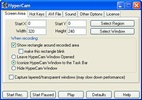
Not only does it allows you to capture the entire screen, but it also lets you select and crop any specific area on screen for you to save.
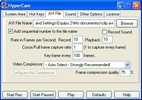
HyperCam has a fair number of settings options, it even comes with the option to pick a Codec for the final AVI file that's generated.
You'll also get to add a specific number to each recording, as well as modify the sound quality for your video or set up hotkeys for using the program itself, and much more.


 11 reviews
















Comments
Could HyperCam capture video (avi) of a single active window only? If not please suggest to me any screen video capture software which could do it. Regards, Ray
The truth is that it is a good program... but it would need sound and we would be complete!
This program is good... and to add music to the videos you record with HyperCam, you need to download another program... if I can, I'll tell you which one it is.
Alex is right; I was able to learn to record, and it was very easy. But after a few days, some error appeared, and I couldn't record anymore. Before that, it was very useful because I was able to uplo...See more
Excellent program, the best. Although with Camtasia Studio and this one, I record using Camtasia and convert it with HyperCam! What a great idea :D You can tell they care! Very good program (:
Tano_Alf is right. The little thing that appears on the bottom side is very annoying, as well as the lack of sound, but it saddens me because it's still a great program. It allowed me to upload videos...See more